Buying land is one of the most significant financial decisions you can make. However, buyers in Telangana often face a critical hurdle: prohibited properties. Investing in restricted land can lead to halted registrations, rejected bank loans, and years of legal disputes.
This guide will explain the prohibited land meaning, how to check the Section 22A list, and the exact steps to take if your property is wrongly listed.
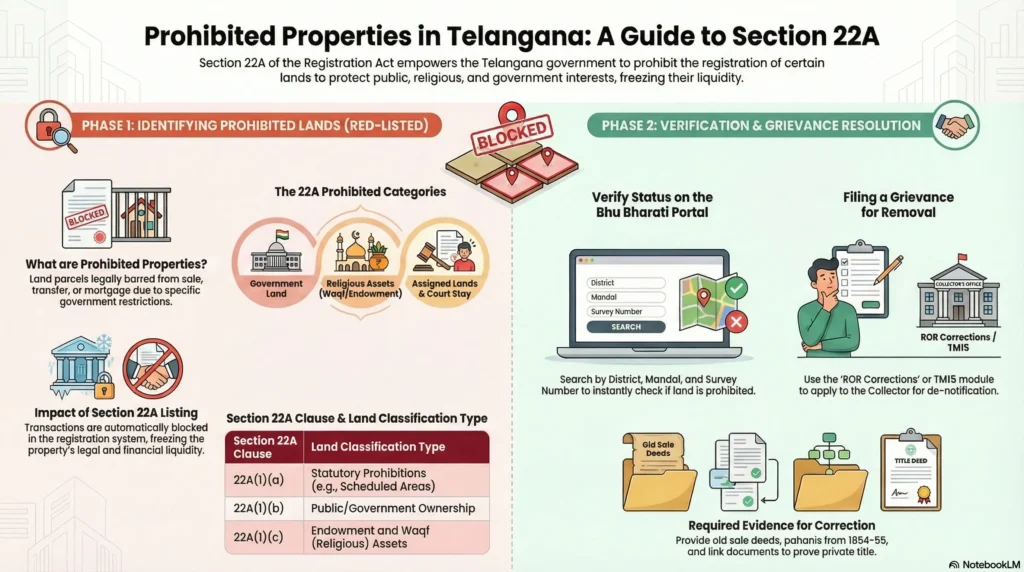
What Are Prohibited Properties in Telangana?
Prohibited properties are lands legally barred from private sale, purchase, or registration. The state restricts these lands to protect public assets, community resources, and environmental boundaries from illegal transactions.
Understanding Section 22A of the Registration Act
These restrictions are governed by Section 22A of the Registration Act, 1908. If a property is on this list, registering authorities are legally bound to refuse any sale or transfer document associated with it.
Common Types of Restricted Lands
Under Section 22A, restricted lands usually fall into these categories:
- (a) Statutory Prohibitions: Transfers banned by state or central laws.
- (b) Government Lands: Owned by the State or Central Government.
- (c) Endowment and Waqf Lands: Owned by religious institutions or the Waqf Board.
- (d) Ceiling Surplus Lands: Declared surplus under Land Ceiling Acts.
- (e) Assigned Lands: Given to landless poor individuals, which cannot be sold to private buyers.
How to Check the Prohibited Property List Online
Before buying, you must check if the survey number is restricted. Telangana splits this process between agricultural and non-agricultural lands.
Step-by-Step Guide Using the Bhu Bharati Portal (Agricultural)
For agricultural lands, Telangana uses the Bhu Bharati portal (which replaced Dharani).
- Visit the Bhu Bharati Portal.
- Go to Information Services and select Prohibited Properties.
- Enter your District, Mandal, Village, and Survey Number.
- Click Fetch. If it says “Govt Land”, “Wakf”, or “Assigned”, do not buy it.
Using the IGRS Portal (Non-Agricultural)
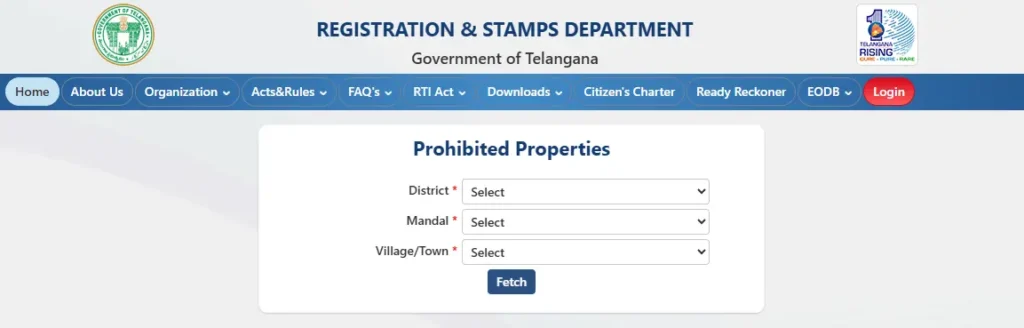
For urban plots and commercial spaces, use the Registration and Stamps Department portal.
- Log into IGRS Telangana.
- Select Prohibited Property search.
- Enter your location details to reveal if the property is blocked by Waqf, Endowments, or Government lists.
Analyzing Property Verification Tools (Competitor Analysis)
While government portals are the official source of truth, peak-hour traffic and complex navigation can be frustrating. Because of this, several third-party platforms have become popular for conducting due diligence.
- Landeed: Great for fast, Aadhaar-free searches, making it popular with NRIs. It aggregates data and flags Section 22A properties instantly.
- mypatta: Focuses heavily on legal verification and offers a 100% refund guarantee if a document is not delivered.
Competitor Comparison Table
| Feature | Gov Portals (Bhu Bharati / IGRS) | Landeed | mypatta |
|---|---|---|---|
| Cost | Free (for basic searches) | Freemium / Paid | Paid Guarantee |
| Best Feature | Official source of truth | High-speed, Aadhaar-free search | 100% refund guarantee |
| Data Scope | Split between Urban/Rural | Aggregated single view | Extended maps (Hydra/FTL) |
The Impact of Buying Prohibited Land
Buying land on the Section 22A list carries massive risks:
- Halted Registrations: The Sub-Registrar will instantly block the transaction.
- Rejected Bank Loans: Banks conduct rigorous title checks and will outright reject home loans for any property flagged under Section 22A.
How to Remove Your Land from the Section 22A List
Sometimes, genuine private patta lands are mistakenly added to the prohibited list due to survey errors. If your land is clear but wrongly listed, you can fix it.
The Grievance Redressal Process
You can resolve this directly through the Bhu Bharati portal:
- Access the ROR Corrections module.
- Select Grievance relating to inclusion in prohibited properties list (TM 15 module).
- Enter your details and the disputed survey number.
- Upload your evidence and submit.
- The District Collector will review the records and pass an order to de-notify the land if your claim is valid.
Essential Documents
To prove your case, ensure you upload:
- Old Sale Deeds
- Pattadar Passbook
- Historical Revenue Records (like Sethwar or Khasra Pahani)
- Official Court Orders (if applicable)