Buying land is one of the most significant financial decisions you can make. However, buyers in Telangana often face a critical hurdle: prohibited properties. Investing in restricted land can lead to halted registrations, rejected bank loans, and years of legal disputes.
This guide will explain the prohibited land meaning, how to check the Section 22A list, and the exact steps to take if your property is wrongly listed.
What Are Prohibited Properties in Telangana?
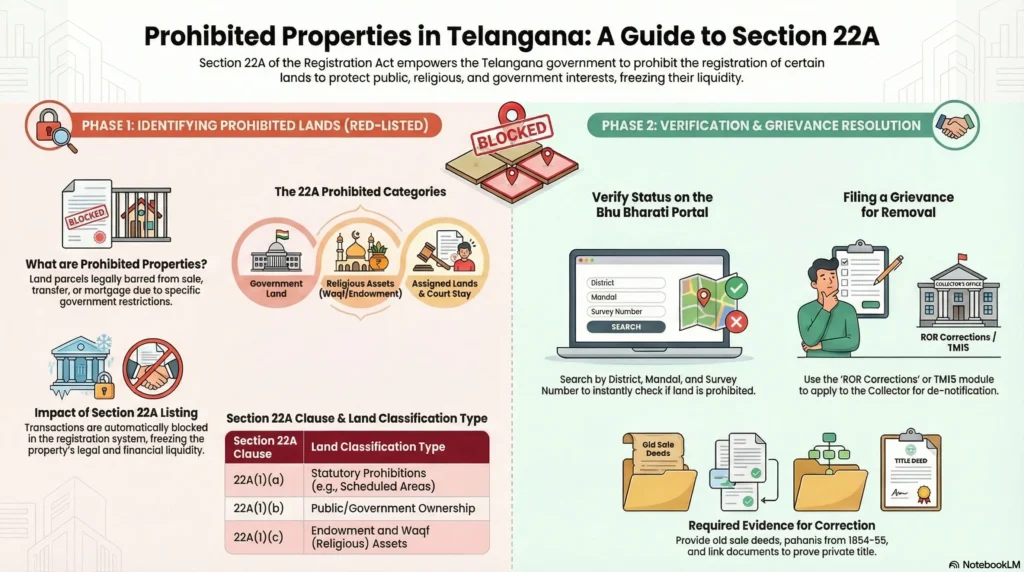
Prohibited properties in Telangana are lands barred from private sale, purchase, or registration under government rules. The state flags these restricted lands in official records to protect public assets, community resources, and environmental boundaries from illegal transactions.
Understanding Section 22A of the Registration Act
The restrictions on these properties are governed by Section 22A of the Indian Registration Act, 1908. This section empowers the State Government to prohibit the registration of certain classes of documents that are deemed opposed to public policy.
If a property falls under the Section 22A list, registering authorities are legally bound to refuse any sale deed, gift deed, or mortgage document associated with it.
Common Types of Restricted Lands
Under Section 22A, prohibited lands generally fall into the following categories:
- Statutory Prohibitions: Properties where transfer is explicitly banned by state or central laws.
- Government Lands: Immovable property owned by the State or Central Government.
- Endowment and Waqf Lands: Properties owned by religious and charitable institutions, temples, or managed by the Waqf Board.
- Ceiling Surplus Lands: Agricultural or urban lands declared as surplus under the Land Reforms or Urban Land Ceiling Acts.
- Assigned Lands: Lands assigned by the government to landless poor individuals for cultivation or housing. These are meant for social welfare and cannot be sold to private buyers.
How to Check the Prohibited Property List Online
Before paying any advance for a property, it is non-negotiable to check if the survey number falls under the prohibited list. Telangana has digitized this process, splitting it between agricultural and non-agricultural portals.
Step-by-Step Guide Using the Bhu Bharati Portal (Agricultural)
For agricultural lands, the state has transitioned to the Bhu Bharati portal (which replaced Dharani).
- Visit the official Bhu Bharati Portal (bhubharati.telangana.gov.in).
- Navigate to the Information Services section and select Land Details Search or Prohibited Properties.
- Select your District, Mandal, and Village from the drop-down menus.
- Enter the specific Survey Number or Sub-Division Number you wish to buy.
- Click Fetch.
If the “Nature of Land” shows statuses like “Govt Land”, “Wakf”, or “Assigned”, do not proceed with the purchase.
Using the IGRS Portal (Non-Agricultural)
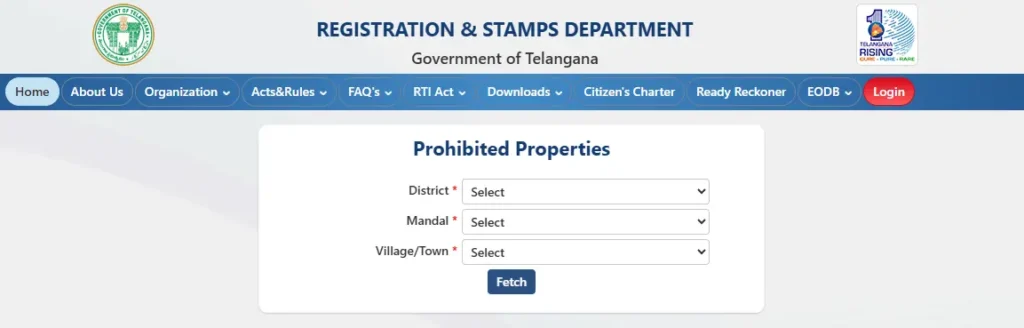
For urban properties, open plots, and commercial spaces, you must use the Registration and Stamps Department portal.
- Log into the IGRS Telangana portal.
- Look for the Prohibited Property search option on the dashboard.
- Enter the District, Mandal, Village, and Survey Number.
- The system will reveal if the property is blocked by Waqf, Endowments, or Government Assignment lists.
The Impact of Buying Prohibited Land
Attempting to buy or register land on the Section 22A list carries severe legal and financial risks.
Halted Registrations and Rejected Bank Loans
If you purchase prohibited land, the Sub-Registrar will instantly block the registration. In many cases, you will have no legal remedy to recover your advance payment from the seller.
Furthermore, financial institutions conduct rigorous title verifications. Banks will outright reject home loans or mortgages for any property flagged under Section 22A due to the legal uncertainty and inability to secure the asset as collateral.
How to Remove Your Land from the Section 22A List
Due to historical survey errors or digital migration issues, genuine private patta lands are sometimes mistakenly added to the prohibited list. If your clear land is wrongly prohibited, the government provides a direct mechanism to resolve it.
The Grievance Redressal Process
You do not need to go straight to court to fix a wrongful entry. The Bhu Bharati system offers a specific module for this:
- Go to the Bhu Bharati portal and access the ROR Corrections module.
- Select Grievance relating to inclusion in prohibited properties list (often referred to as the TM 15 module).
- Enter your Pattadar Passbook (PPB) number or Aadhaar details, and select the disputed survey number.
- State the reason why the property should be deleted from the prohibited list and submit your application.
- The District Collector or authorized Revenue Divisional Officer will conduct a field inquiry, examine the records, and pass a speaking order to de-notify the land if your claim is genuine.
Essential Documents
To successfully remove your property from the prohibited list, you must provide airtight historical proof. Ensure you upload:
- Old Sale Deeds: Documents proving private ownership that pre-date the prohibition.
- Pattadar Passbook: Your current or old physical passbook.
- Historical Revenue Records: Khasra Pahani (1954-55) or Sethwar documents showing the land was historically cultivated as private patta land.
- Court Orders: If you have already won a legal dispute regarding the land’s title, attach the official court decree.